

Email 2.0
The Kaleyra platform allows you to send email as a communication channel to communicate with end users. This sub-category contains the information on enabling Email 2.0 and using Email 2.0 to communicate marketing and transactional emails. Also, information about domain configuration, email address management, dedicated IP mapping, and logs for emails sent through the Email APIs.
Notes:
- To enable the Email 2.0 channel for your Kaleyra platform, contact Support team.
- Email 2.0 is only available for the IN region.
- Only Marketing and Transactional type emails are supported.
Prerequisites
- A domain purchased and owned by you from any domain provider.
- You must have Kaleyra account. After you sign up, your account will be on the trial version. You must complete the KYC to access all the features in kaleyra.io.
- Before you get started, Create an API Key. To view the API Key and the SID, see View API Key and SID.
- To send any email, you must configure the email 2.0 channel in the Kaleyra platform. To configure the email 2.0 channel in your kaleyra.io account, please contact your local Kaleyra representative.
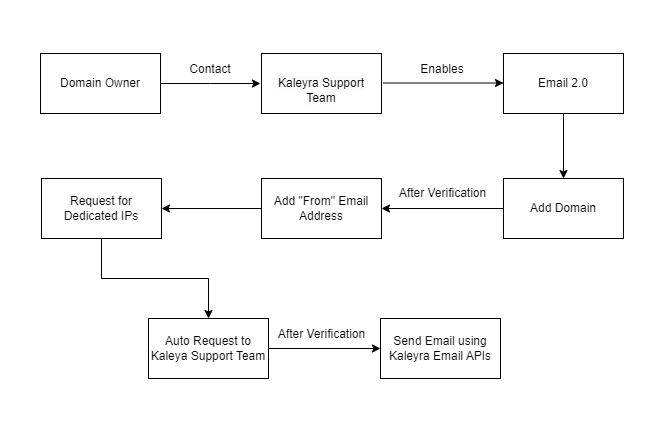
Onboarding flow for Email 2.0
The following is the Email 2.0 onboarding flow diagram; only once all the steps below are completed, the service is ready to be used.
Email 2.0 Features
Click the cards to explore the Email 2.0 features:
Want to launch email campaigns through Email APIs, add and manage your registered domain in Kaleyra platform.
Configure DNS details from Kaleyra platform to your domain hosted site.
Add your email address to send email to your end users.
Add your IPs to send emails through dedicated IPs.
Email logs get generated when you send or receive an email using email APIs.
Updated about 1 month ago