The Kaleyra platform allows you to keep the record of all online recharges both performed manually and through auto debit for accurate tracking. A prepaid account operates on an advance balance model where communication charges (SMS, Voice, WhatsApp, RCS, and many more) are deducted from the available account wallet.
The billing history typically provides visibility into:
- Recharge History: Details of wallet top-ups or recharges made to the account.
- Recharge Date: The date when balance was added.
- Recharge Amount: Value of the latest recharge transaction.
- Current Balance: Available funds remaining in the prepaid wallet.
- Currency: The billing currency configured for the account.
To view the billing history, perform the following steps:
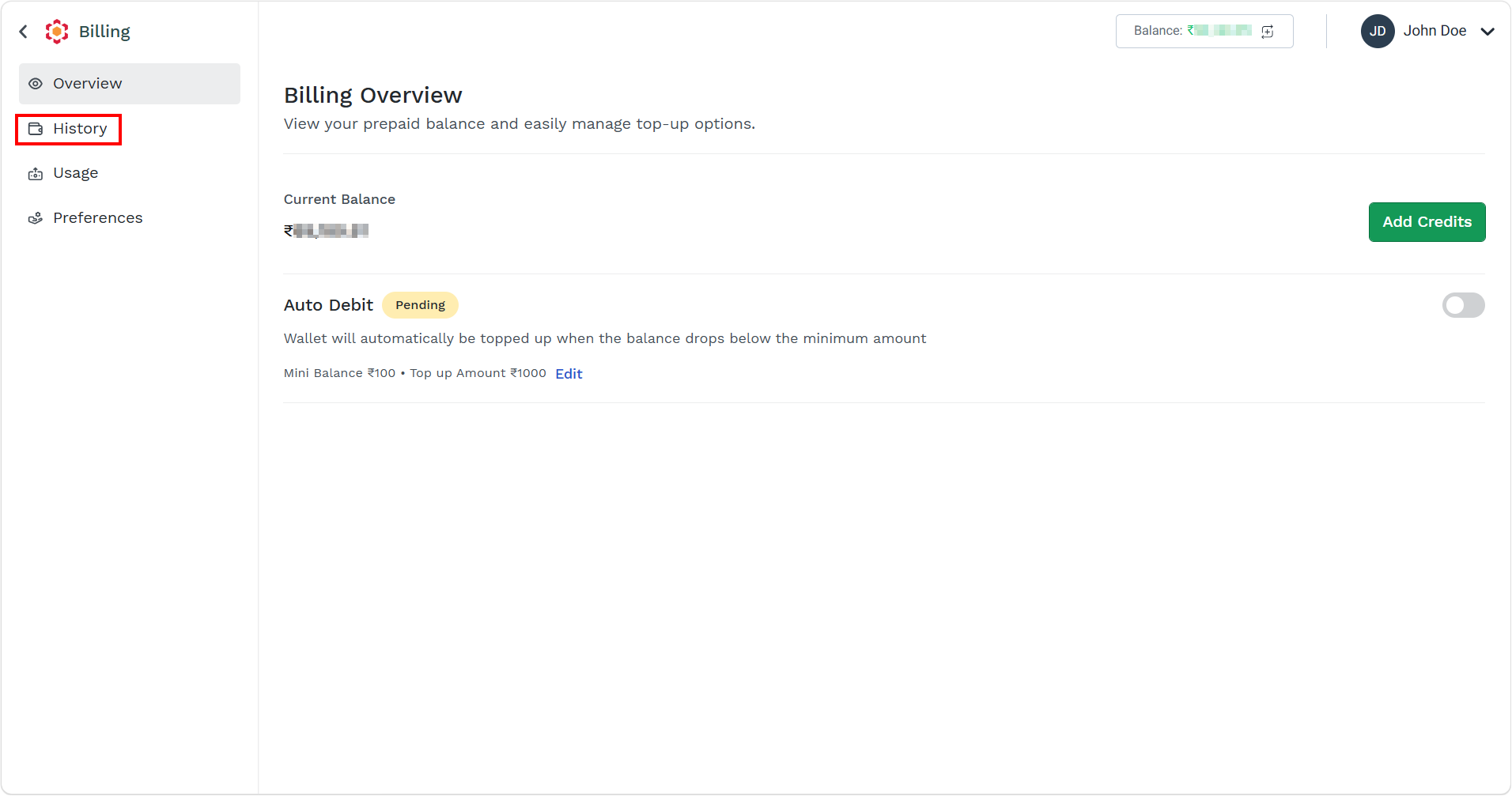
- Follow step 1 and step 2 of Prepaid Billing Overview.
The Billing Overview page appears.
- On the left menu bar, click the History menu.
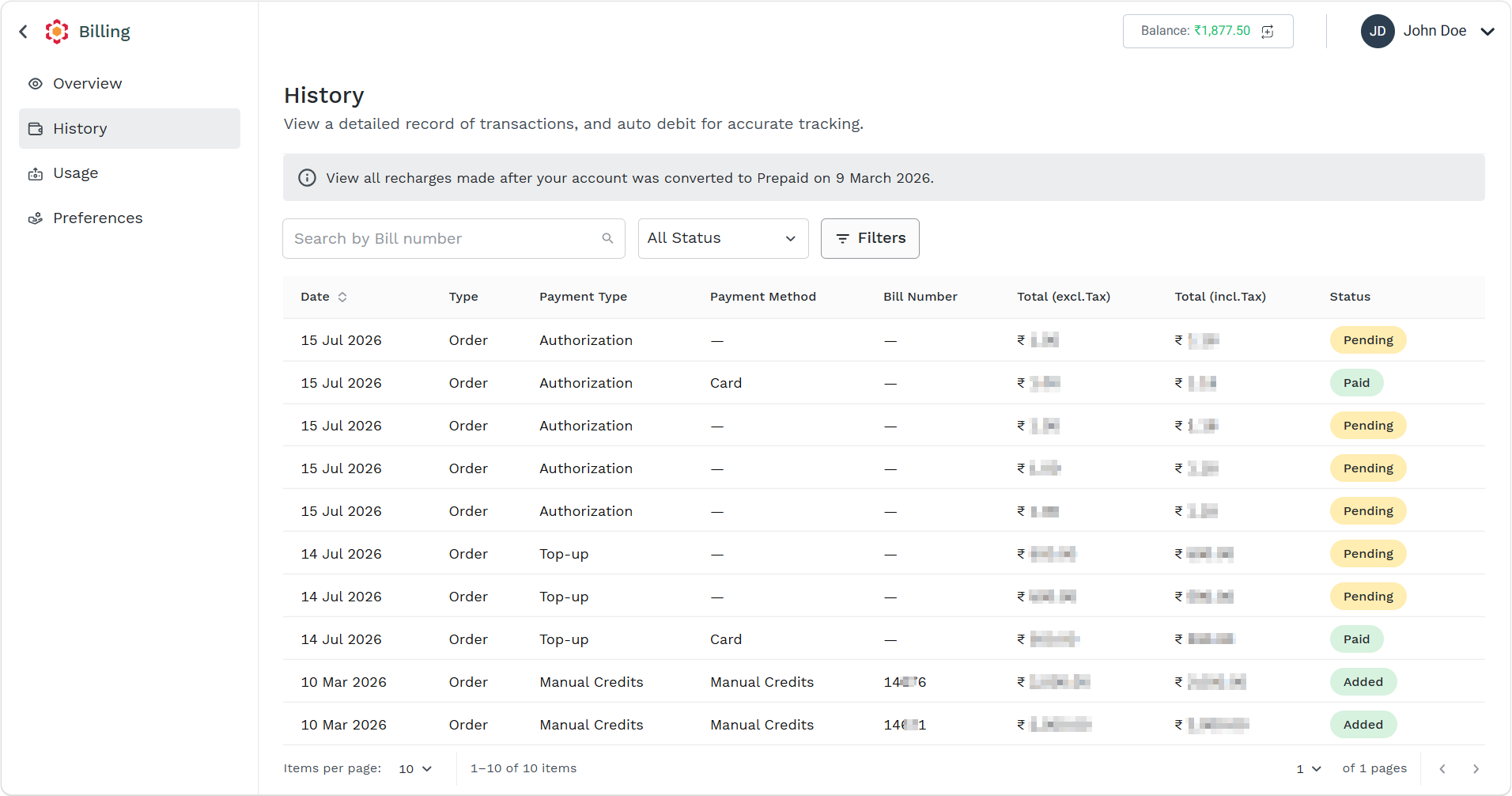
The History page appears.
The following details appear:
| Column Field Name | Description | Example |
|---|
| Date | The date on which the payment, recharge, or billing transaction was recorded. | 15 Jul 2026 |
| Type | Type of transaction for billing. The following are the types:
- Order - The initial purchase or recharge request raised from your Kaleyra account. It captures the details of the service or prepaid credit being purchased before invoicing and payment processing. An order indicates that your intent to buy and forms the basis for billing.
- Invoice - The formal billing document generated against an order. It specifies the recharge amount, applicable taxes, invoice number, billing details, and the total amount due. An invoice is used for accounting, tax, and payment reconciliation purposes.
- Payment receipt - Generated after Kaleyra successfully receives and records your payment against an invoice. It serves as proof of payment and typically confirms the amount paid, payment method, transaction reference, and payment date.
| Order |
| Payment Type | Payment type for the transaction. The following are the supported payment types:
- Top-up - A prepaid recharge that adds funds or credits to the Kaleyra account balance. This is the most common method for maintaining sufficient balance for messaging and communication services.
- Auto Debit - An automatic payment collected by Kaleyra from a pre-authorized payment source (such as a saved card or bank account) when certain billing conditions are met, helping ensure uninterrupted service.
- Manual Credits - Credits added manually by Kaleyra, typically as an account adjustment, promotional credit, goodwill credit, dispute resolution, or correction of a previous billing issue.
- Payment Link - A payment made through a payment URL generated by Kaleyra. You can receive or access the link and complete the payment through the supported payment gateway.
- Authorization - A transaction where Kaleyra verifies and reserves funds on your payment method before actual capture or settlement. This is commonly used to validate payment credentials or secure future charges.
| Authorization |
| Payment Method | The method used to make the payment. The following are the supported payment methods:
- Card - Payment completed using a credit card or debit card through a supported payment gateway. Funds are typically credited upon successful authorization and settlement.
- NEFT/IMPS - Payment made using Indian electronic banking systems. NEFT (National Electronic Funds Transfer) is generally used for scheduled bank transfers, while IMPS (Immediate Payment Service) enables near real-time fund transfers.
- Wallets - Payment made through a digital wallet service, where you can use preloaded funds or a linked payment source to complete the transaction.
- UPI - Payment made through India's Unified Payments Interface (UPI). You can pay instantly using a UPI ID, QR code, or supported UPI application.
| Card |
| Bill Number | Unique invoice or billing reference number associated with the transaction. Used for tracking and reconciliation. | 14XX6 |
| Total (excl.Tax) | The transaction amount before any taxes (for example, GST/VAT) are applied. | ₹ X,XXX.XX |
| Total (incl.Tax) | The final transaction amount including all applicable taxes. | ₹ X,XXX.XX |
| Status | Current state of the transaction. The following are the supported transactions:
- Paid - The payment has been successfully received and applied to the corresponding invoice or account. The prepaid balance is updated, and the transaction is considered complete.
- Unpaid - An invoice or payment request has been generated, but no payment has been received yet. The transaction remains outstanding until the you complete the payment.
- Pending - The transaction has been initiated but is still being processed. This may occur while awaiting payment confirmation from a bank, payment gateway, or manual verification.
- Failed - The payment or transaction could not be completed successfully. Common reasons include payment authorization failure, insufficient funds, banking issues, gateway errors, or invalid payment details.
- Added - A credit, adjustment, or balance addition has been successfully posted to the account. This status is commonly associated with Manual Credits or account adjustments rather than your payment.
| Added |
- You can perform the following: