

RCS Template APIs
The RCS Template API allows you to create, update, view, and delete RCS message templates. These templates can include text, rich text, files, rich cards, and carousels. You can use dynamic variables to personalize the actual message sent to any given recipient using the template.
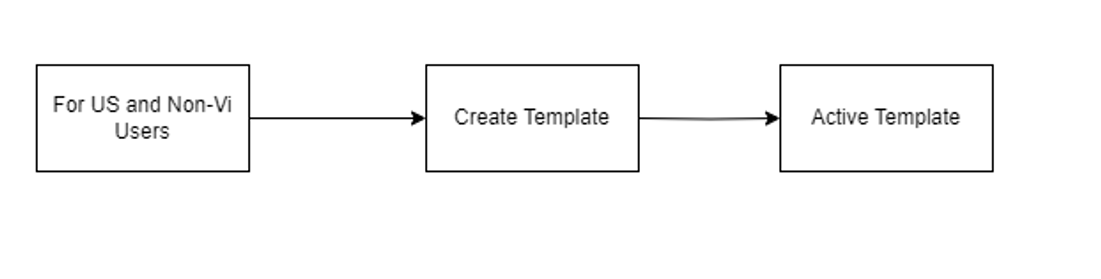
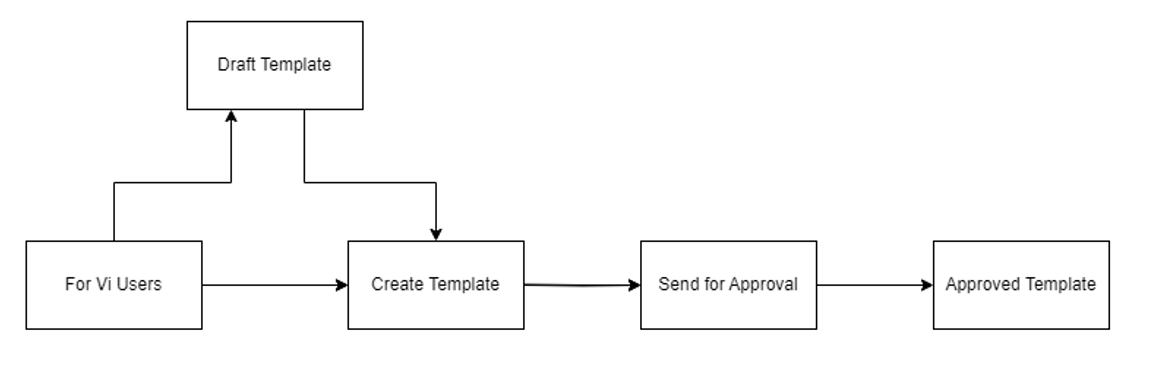
A template can be used for messaging only when its status is Active or Approved. In US region and for template used with RCS Agent not related to Vodafone Idea in IN region, automatic approval is possible by setting the template status to Active during creation. For other Agents, template will be approved from related RCS authority. After a template is set to Active, it can no longer be edited.
Notes:
- For US region, after the template is created successfully, the template becomes active. You can edit the template until it becomes Active. Once template is Active, you can send message using Template ID.
- For IN region Vi (Vodafone Idea) Agents, a template can be created as a draft, and it must be submitted for approval. Once approved, the template becomes approved. Once template is active, you can send message using Template ID. You can send only 30 messages in Vi through unapproved template.
India RCS Template Workflow
The following is the India RCS Template Workflow, outlining the template status, integration status, integration response, and the corresponding trigger for each stage.
| Status | Integration Status | Integration Response | Integration Response |
|---|---|---|---|
| CREATED | NA | Carrier Identifier | Upon Template Creation |
| ACTIVE | APPROVED | NA | Upon Template Approval from Carrier |
| FAILED | REJECTED | CARRIER ERROR | Upon Template rejection from carrier |
| DELETED | FAILED | NA | Upon Template Deletion |
Sample Statuses
The following are Sample Statuses:
{
        "template_id": "129f4804-80b4-4e64-b2bc-3271XXXXa248",
        "created_date": 1783XXX923105,
        "agent_number": "16000",
        "template_type": "4",
        "template_name": "SURVEY_REWARD_PROMO",
        "rich_card_standalone": {
            "card_orientation": "VERTICAL",
            "thumbnail_image_alignment": "LEFT",
            "content": {
                "title": "A few minutes. A little feedback. A nice reward.",
                "description": "We've got a quick survey waiting for you. Share your thoughts and earn rewards when you complete it successfully.",
                "media": {
                    "height": "MEDIUM",
                    "file": {
                        "file_url": "https://rcs.in.kaleyra.io/1779XXXX94958-new.jpg",
                        "thumbnail_url": "https://rcs.in.kaleyra.io/17XXXX7990768-new.jpg",
                        "content_description": "5-minute survey, earn Rs 830.",
                        "force_refresh": false
                    }
                },
                "suggestions": [
                    {
                        "action": {
                            "text": "Share Your Opinion Now!",
                            "postback_data": "RCS_SMS_REWARD1",
                            "open_url_action": {
                                "url": "https://reward.in/{{var0}}",
                                "application": "OPEN_URL_APPLICATION_UNSPECIFIED",
                                "webview_view_mode": "WEBVIEW_VIEW_MODE_UNSPECIFIED"
                            }
                        }
                    }
                ]
            }
        },
        "status": "ACTIVE",
        "template_number": "MRIT4XXXXXX2",
        "placeholders": "[\n  \"var0\"\n]",
        "integration_status": "APPROVED",
        "integration_response": "{\n  \"A few minutes. A little feedback. A nice reward.\": \"9030f5937XXXXXX41b4f76\"\n}"
}'{
"template_id": "275f8f0c-90cd-4535-92c1-b1XXXXXX6b94",
"created_date": 178349XXXXX06,
"agent_number": "16000",
"template_type": "5",
"template_name": "SURVEY_REWARD_PROMO",
"rich_card_carousel": {
"card_width": "MEDIUM",
"card_contents": [
{
"title": "A few minutes. A little feedback. A nice reward.",
"description": " Hello {{var0}} We've got a quick survey waiting for you. Share your thoughts and earn rewards when you complete it successfully.",
"media": {
"height": "MEDIUM",
"file": {
"file_url": "https://rcs.in.kaleyra.io/17799495XXXX6-new.jpg",
"content_description": "",
"force_refresh": false
}
},
"suggestions": [
{
"action": {
"text": "Share Your Opinion Now!",
"postback_data": "RCS_SMS_REWARD1",
"open_url_action": {
"url": "https://reward.in/{{var1}}",
"application": "OPEN_URL_APPLICATION_UNSPECIFIED",
"webview_view_mode": "WEBVIEW_VIEW_MODE_UNSPECIFIED"
}
}
}
]
},
{
"title": "You’ve been selected for a quick survey by {{var2}} 🎉",
"description": "Takes only a few mins.Earn rewards on successful completion Tap below to participate now.",
"media": {
"height": "MEDIUM",
"file": {
"file_url": "https://rcs.in.kaleyra.io/1779949637674-O-2_1.jpg",
"content_description": "",
"force_refresh": false
}
},
"suggestions": [
{
"action": {
"text": "Start Survey Now",
"postback_data": "RCS_SMS_REWARD2",
"open_url_action": {
"url": "https://reward.in/{{var3}}",
"application": "OPEN_URL_APPLICATION_UNSPECIFIED",
"webview_view_mode": "WEBVIEW_VIEW_MODE_UNSPECIFIED"
}
}
}
]
}
]
},
"status": "ACTIVE",
"template_number": "MRBO9H2P8C68",
"placeholders": "[\n \"var0\",\n \"var1\",\n \"var2\",\n \"var3\"\n]",
"integration_status": "APPROVED",
"integration_response": "{\n \"A few minutes. A little feedback. A nice reward.\": \"bebd29ed77b6486bb610e8\",\n \"You’ve been selected for a quick survey by [var2] 🎉\": \"966cc2aca76f43a88fc3df\"\n}"
}, {
"template_id": "ffa3240f-3428-4431-8cb0-61ed43bc0fc4",
"created_date": 1783922798580,
"agent_number": "16000",
"template_type": "4",
"template_name": "SURVEY_REWARD_PROMO",
"rich_card_standalone": {
"card_orientation": "VERTICAL",
"thumbnail_image_alignment": "LEFT",
"content": {
"title": "You’ve been selected for a quick survey by Ipsos Crownit 🎉",
"description": "Takes only a few minutes. Earn rewards on successful completion. Tap below to participate now.",
"media": {
"height": "MEDIUM",
"file": {
"file_url": "https://rcs.in.kaleyra.io/1779949560768-new.jpg",
"content_description": "5-minute survey, earn Rs 830",
"force_refresh": false
}
},
"suggestions": [
{
"action": {
"text": "Start Survey Now",
"postback_data": "RCS_SMS_REWARD2",
"open_url_action": {
"url": "https://feedback.crownit.in/{{var0}}",
"application": "OPEN_URL_APPLICATION_UNSPECIFIED",
"webview_view_mode": "WEBVIEW_VIEW_MODE_UNSPECIFIED"
}
}
}
]
}
},
"status": "CREATED",
"template_number": "MRITKOVQYDQQ",
"placeholders": "[\n \"var0\"\n]",
"integration_exception": "Failed to process Vi template submission. {error: {\"error\":{\"code\":400,\"message\":\"Template with name MRITKOVQYDQQ not found\",\"status\":\"Bad Request\"}}}",
"integration_status": "FAILED"
},List of RCS Template APIs
The Kaleyra platform supports the following RCS Template APIs:
If you want to create an RCS Template using the Kaleyra platform UI, see Add Template.
Updated about 1 month ago