

Audio Message
An Audio Message consists of either a Voice Message or a Basic Audio Message.
Voice Messages
A voice message (sometimes referred to as a voice note, voice memo, or audio) is a recording of one or more persons speaking and can include background sounds like music. Voice messages include features like automatic download, profile picture, and voice icon, not available with a basic audio message.
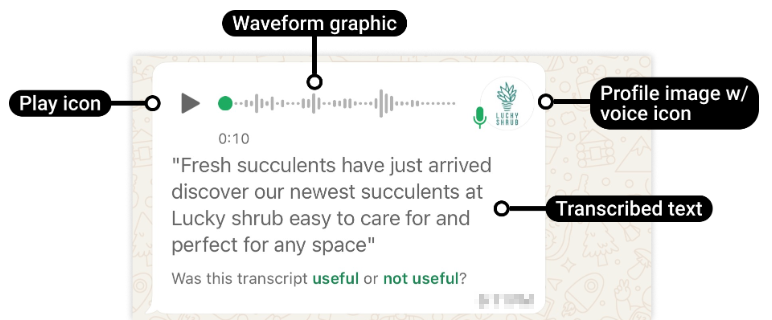
The play icon will only appear if the file is 512KB or smaller, otherwise it will be replaced with a download icon (a downward facing arrow).
End user's profile image is used as the profile image, accompanied by a microphone icon.
Basic Audio Messages
Basic audio messages display a download icon and a music icon. When the business taps the play icon, the business must manually download the audio message for the WhatsApp client to load and then play the audio file.

The download icon will be replaced with a play icon if the WhatsApp number has enabled auto-download for audio media and conditions for auto-download are met. For example, connected to wi-fi.
Prerequisites
- An active WhatsApp plan on Kaleyra platform.
- An active WhatsApp for Business API plan that includes:
- A WhatsApp business number.
- An associated profile with the business number.
- A WhatsApp verified and approved profile.
- A WABA ID onboarded on Kaleyra WhatsApp API V2.
- You must have the callback registered in the WhatsApp channel for the phone numbers.
{
    "meta_object": {
        "value": {
            "messaging_product": "whatsapp",
            "metadata": {
                "display_phone_number": "918XXXXXXXXX",
                "phone_number_id": "10460XXXXXXXXXX"
            },
            "contacts": [
                {
                    "profile": {
                        "name": "Samuel"
                    },
                    "wa_id": "919XXXXXXXXX"
                }
            ],
            "messages": [
                {
                    "from": "919XXXXXXXXX",
                    "id": "wamid.HBgMOTE5NzQwNzc2NTA1FQIAEhggNTI2XXXXXXXXXXMUUzRUIxMTY0YwMTAzRjc3M0JEQjkA",
                    "timestamp": "172XXXXXXX",
                    "type": "audio",
                    "audio": {
                        "mime_type": "audio\/mp4",
                        "sha256": "GNM0\/gG8l2cYu8KVVR4X60iXXXXXXCRZEDNn0bb7\/rM=",
                        "id": "850XXXXXXXXXXXX",
                        "voice": false
                    }
                }
            ]
        },
        "field": "messages"
    },
       "extra_info": {
      	 		"media_url": "https://example.com/images/product123.jpg",
      	 		"ref": "Hello This will be my reference id - 123",
      	 		"ref1": "shoes campaign",
      	 		"ref2": "summer sale campaign",
      			"reply_to": "48c38d78-4ec5-XXXX-abee-03XXXXXX6c85",
       	 		"trace_id": "cb94fee2-3e70-XXXX-944a-2a4XXXXdb90a",
      	 		"waba_id": "347XXXXXXXXXX69"
    }
}Note:
In a shared audio message, the voice parameter is set to false, while in a recorded audio message, the voice parameter is set to true.
The extra_info object contains additional metadata related to end-user message or reply. These fields help in tracking message context, references, and internal identifiers.
The following describes each field within the extra_info object:
| Parameter | Data Type | Description | Example |
|---|---|---|---|
media_url | URL | Contains the URL of the media (image, video, document, and many more) shared by the end user, if applicable. | https://example.com/images/product123.jpg |
ref, ref1, and ref2 | String | A reference parameter provided by the brand during the original message send request. This value appears in extra_info only when:i. The end-user replies to a previous message by selecting or highlighting it, or ii. The end-user responds through an interactive element (for example, a button) from an earlier message. | shoes campaign |
reply_to | String | This field represents the parent message ID (the original message to which the end-user is replying) in the following scenarios: i. The end-user replies to a previous message by selecting or highlighting it, or ii. The end-user responds through an interactive element (for example, a button) from an earlier message. Note: If there is NO parent message ID, the reply_to field in the callback will be empty. | 48c38d78-4ec5-XXXX-abee-03XXXXXX6c85 |
trace_id | String | An internal Kaleyra-generated identifier used for message tracing and debugging. | cb94fee2-3e70-XXXX-944a-2a4XXXXdb90a |
waba_id | String | The WhatsApp Business Account (WABA) ID associated with the message. | 347XXXXXXXXXX69 |

Updated 8 months ago