

Add Contacts in Batch for Campaign
While scheduling the campaign, you can configure to manage the campaign in batches when you have more than 1000 contacts. While creating the batch for contacts, you have the option to add the number of contacts you want to send in a batch and set the interval after which the next batch of contacts will be triggered. Batch allows you to send messages to end-users in controlled groups rather than all at once.
To launch the campaign in batches, perform the following steps:
- Follow step 1 to step 12 of Launch a WhatsApp Campaign for V2 WABA.
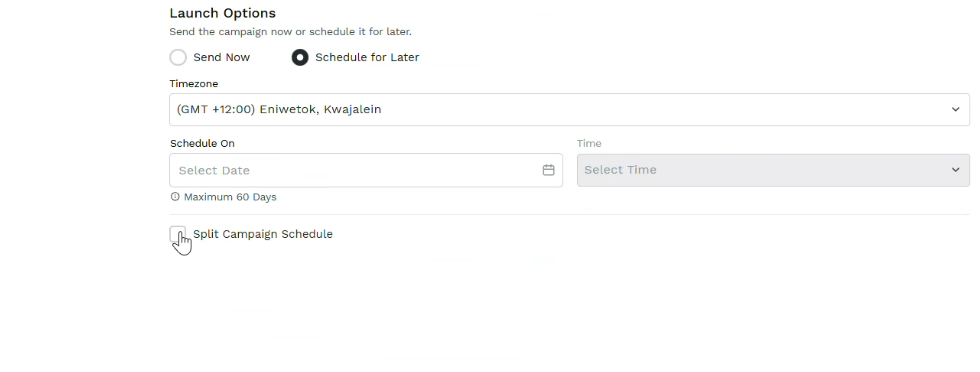
- In the Launch Option section, select the Schedule for Later option and then perform the following steps:
- Click the Timezone drop-down field and select the time-zone where you want to send the campaign messages.
- Click the Scheduled On calendar icon, select the date when you want to launch the campaign. You can select a maximum of 60 days in advance of the current date.
- Click the Time drop-down field and select the time when you want to schedule the campaign.
- Select the Split Campaign Schedule checkbox to split the campaign to different schedules.
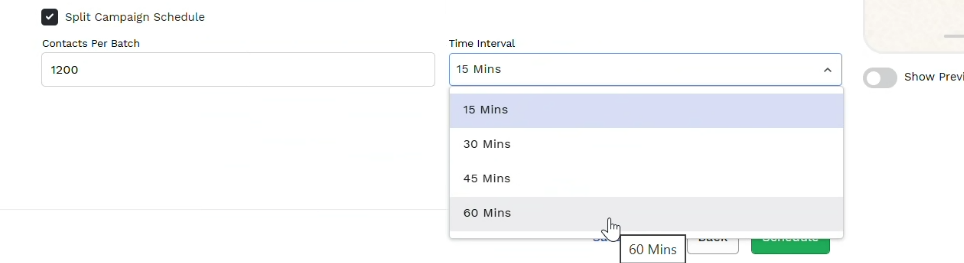
- In the Contact Per Batch field, enter the number of contacts you want to send the messages in a batch.
- Click the Time Interval drop-down and select any one of the following intervals after which you want to send the campaign messages in second batch:
- 15 Mins
- 30 Mins
- 45 Mins
- 60 Mins
- Click the Schedule button. The campaign gets scheduled in batches. To view the batch details, see View Batch Details.
Updated 5 months ago
Did this page help you?