

SMS Campaign
SMS Campaign on the Kaleyra.io platform enables businesses to send promotional, transactional, and OTP messages in bulk, using the SMS channels to worldwide customers.
The key benefits of using the Kaleyra SMS Campaign are:
No API calls
Send bulk messages with ease, using a 'no-code interface'.
Easy contact selection
Send bulk messages with ease, using a 'no-code interface'.
Quick launch
Send bulk messages with ease, using a 'no-code interface'.
Select either content from template or type as you wish
Option to use text from templates or write the text directly in the interface, or even personalize and tailor-make the messages to individual customers using dynamic parts.
Scheduled launch
Specify if the campaign should launch immediately or later.
Shortened URL
Use shortened URLs for optimized real-estate usage in messages.
Track clicks
Track global and unique clicks of the shortened URL.
Campaign List Page
The Campaign list page allows you to view and manage all your campaigns. From the dashboard, you can view the campaign details, launch a campaign, and search and filter campaigns.
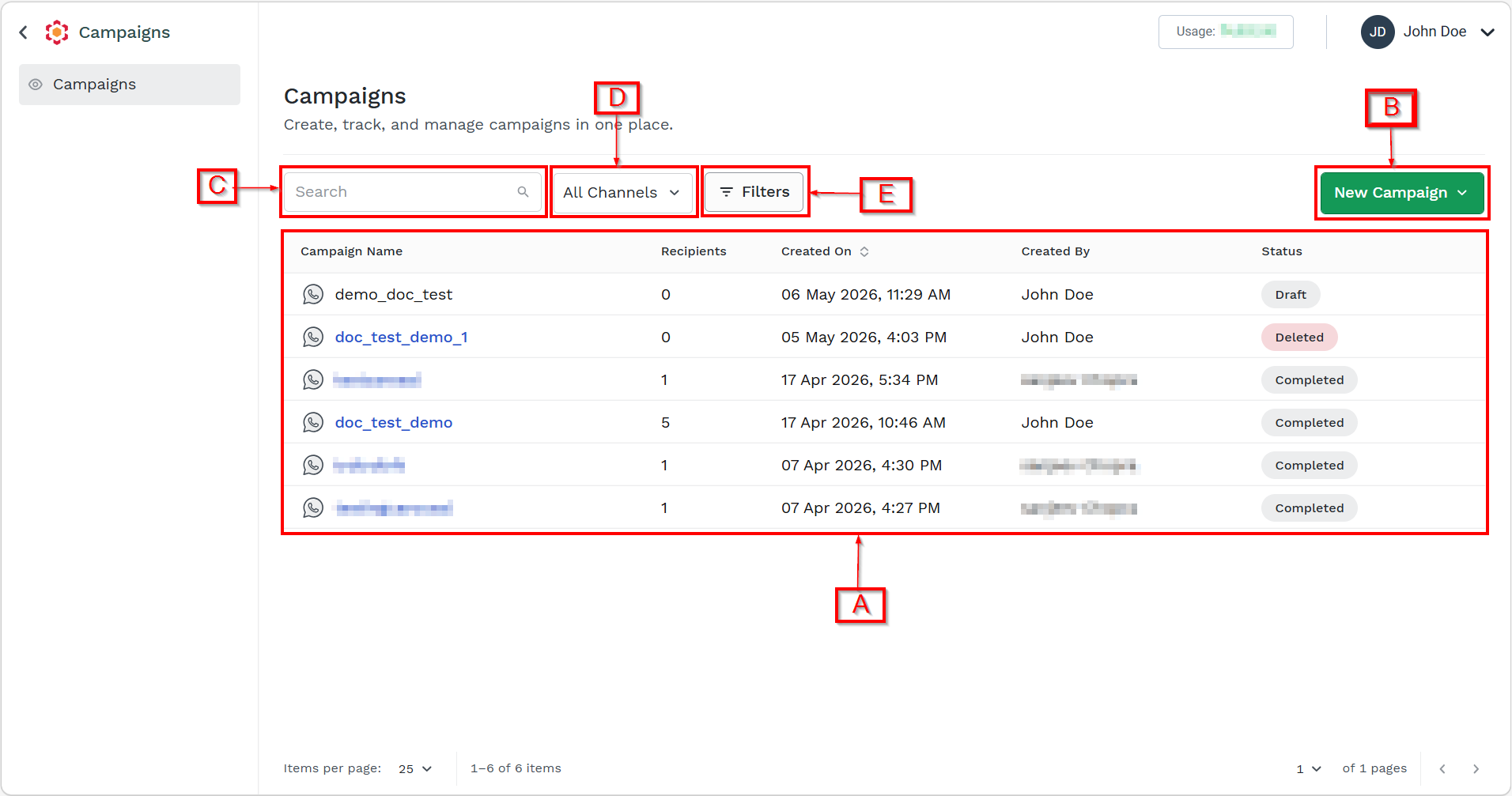
On the dashboard, you have the following options:
- A - View the available campaign details. You can view the following details:
- Campaign Name - Displays the name of the campaign provided during campaign creation.
- Recipients - Displays the total number of end users targeted in the campaign.
- Created On - Indicates the date and time when the campaign was created. The date is displayed in the format DD/MM/YY, and the time is displayed in HH:MM format.
- Created By - Displays the end user who created the campaign.
- Status - Displays the current state of the campaign. You can view the following statues:
- Draft: Campaign is created but not submitted or scheduled. It can be edited, deleted, and viewed.
- Scheduled: Campaign is configured to be sent at a future date/time. It can be viewed, rescheduled, modified or deleted.
- In Process: Campaign messages are actively being processed and sent. It can be cancelled and viewed.
- Completed: Campaign processing is fully complete. It can be viewed and reports can be downloaded.
- Failed: Campaign failed to process (partially or fully) due to errors. It can be viewed.
- Cancelled: Campaign was manually cancelled before completion. It can be viewed.
- Deleted: Campaign was removed and is no longer active.
- B - New Campaign. You can create a new campaign. For more information, see Launch an SMS Campaign.
- [Updated Soon] C - Search Campaign - You can search a campaign according to name provided during campaign creation. For more information, see Search Campaign.
- [Updated Soon] D - You can filter the campaigns based on Channels. For more information, see Filter Campaign based on Channels.
- [Updated Soon] E - Filter - You can filter the campaigns based on created date and campaign status. For more information, see Filter Campaign.
Updated 4 months ago