

Brands Dashboard Overview
The Brands Dashboard serves as the centralized entry point for managing all brand-related configurations within the RCS (Rich Communication Services) portal. It provides a clear, structured view of every brand registered in the system and offers quick controls for creating, updating, and maintaining brand information.
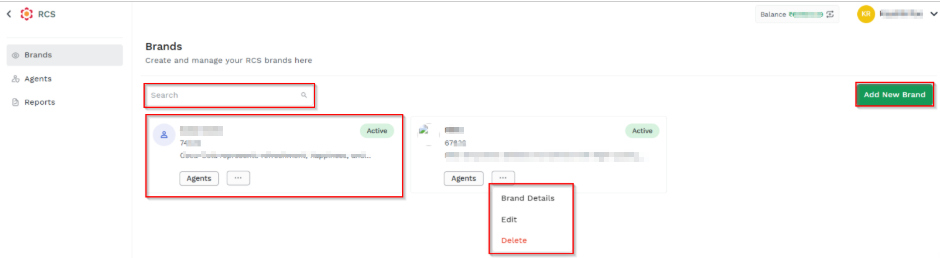
The Brands dashboard is designed to:
- Provide a unified view of all brands
- Simplify brand lifecycle management
- Enable quick navigation to deeper configuration areas
- Allow non-technical users to manage brands without prerequisites
On the Brands dashboard, you can perform the following options:
- View brand details - list of all available brands in the dashboard. Each brand entry typically includes details such as the brand name, status, and associated agents. For more information, see Brand Details page.
- Search - End users can quickly find a specific brand by using the search option available on the dashboard. For more information, see Search Brand page.
- Add a New Brand - Creates a new brand by using the Add a New Brand option and filling in the required brand information. For more information, see Add a New Brand page.
Updated 22 days ago
Did this page help you?