

The WhatsApp Calling Wrapper API documentation allows you to provide the integration details, API specifications, request and response formats for WhatsApp Calling functionalities offered by Kaleyra WhatsApp channel through Kaleyra.
Tech Providers or Direct Customers need an endpoint to initiate, accept, reject, or terminate WhatsApp calls, and Tata Communications Kaleyra’s wrapper API layer would allow them to integrate the same.
The Tata Communications Kaleyra platform would take care of:
- API endpoints support for Meta WhatsApp Calling.
- Request or response handling abstraction.
- Authentication and platform-level integration support.
Businesses having their Voice infra capabilities can:
- Manage Infrastructure setup and hosting.
- Webhook endpoint creation and management.
- Webhook event handling and processing.
- Meta app configuration and permissions.
- Callback handling and business workflow implementation.
-
Compliance with Meta platform policies and requirements.
PrerequisiteObtain permission from end-user to initiate WhatsApp call
Before initiating an outbound WhatsApp voice call, you must obtain call permissions from the WhatsApp end-user through one of the following methods:- Send a call permission request message to the end-user phone number.
- Enable
callback_permission_statusin call settings.
High-Level WhatsApp Calling Flow
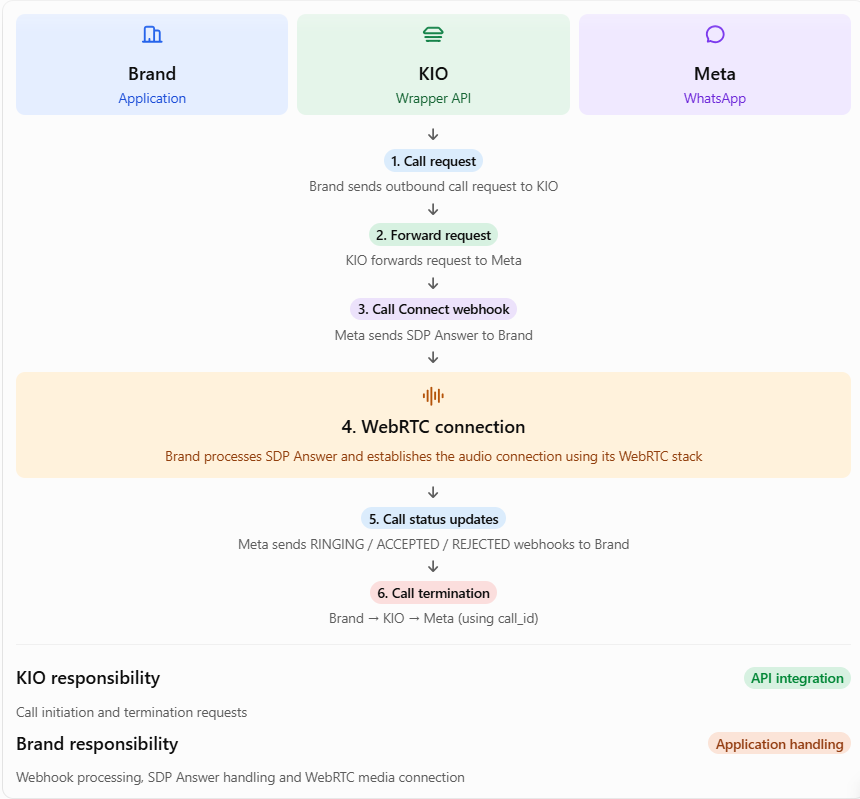
The following diagram illustrates the high-level interaction between the Brand Application, KIO (Calling Wrapper API), Meta WhatsApp Platform, and the WebRTC stack during an outbound WhatsApp Voice call.
Call Connection and Webhook Handling
Once a business successfully initiates an outbound call, Meta sends a Call Connect webhook containing the Session Description Protocol (SDP) Answer.
You must pass the received SDP Answer to your WebRTC stack to complete the session negotiation and establish the media connection
Following the call initiation and connection process, you will receive subsequent status webhooks indicating call events such as RINGING, ACCEPTED, or REJECTED.
Webhook processing, SDP Answer handling, and WebRTC media connection establishment are managed by the business application and are outside the scope of the Calling Wrapper API.
Call Termination
Businesses can terminate an existing WhatsApp voice call by invoking the Calling Wrapper API with the terminate action and the corresponding WhatsApp call_id.
The API forwards the termination request to Meta and returns the processing result.
This page contains the following topic: