

The WhatsApp Direct Send Message API simplifies WhatsApp Utility and Authentication messaging by enabling you to send business-initiated messages without creating and managing message templates manually.
Benefits:
Direct Send allows you to send Utility and Authentication messages even without having a pre-approved template. Direct Send streamlines the integration process, reduces template management complexity, and provides greater flexibility when template recategorization policies are enforced. This allows you to accelerate deployment of Utility and Authentication messaging use cases while leveraging WhatsApp as a scalable communication channel.
Note:
- The Direct Send Message API feature is currently defined on the beta stage by Meta. Please contact your Kaleyra Representative to enable Direct Send capability for your WhatsApp Business Account (WABA).
- Direct Send Message API can be used only with Utily or Authentication message type.
How Direct Send Works
Direct Send automatically creates templates and matches message content against existing templates before sending. Template creation and message match is executed on Meta side once the request is received at Meta from Kaleyra Platform.
Flow Diagram:
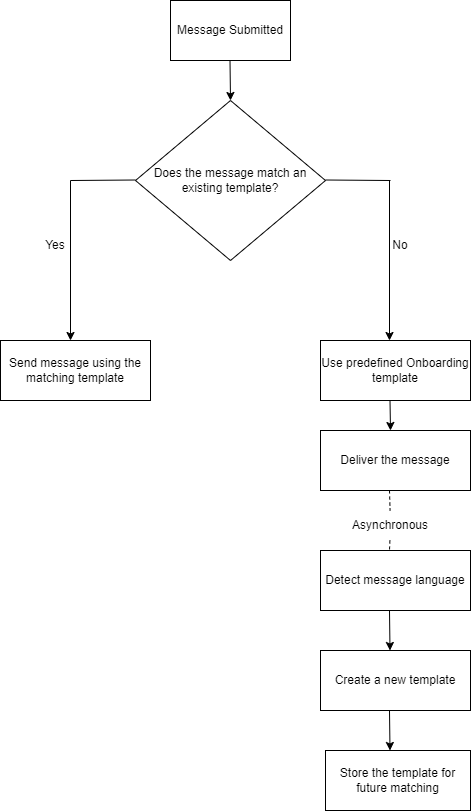
Message Processing Flow
When a message is submitted:
- Meta first checks whether the message content matches an existing template already approved and stored by Meta.
- If a matching template is found, the message is sent using that template.
- If no matching template exists, Meta falls back to predefined onboarding templates to continue message delivery.
- Meta then asynchronously creates a new template based on the submitted message content for future use.
Auto Template Creation
During auto template creation:
- The message language is detected automatically.
- A new template is generated and stored for subsequent matching requests.
Direct Send with template_name field
template_name fieldTo enable easier integration with existing systems and provide more predictable message attribution—specifically, identifying which message corresponds to which template—businesses can specify the template name when using the Direct Send API.
Using direct_send_config.template_name field.
To use a business named template, add the direct_send_config object with atemplate_name field to your Direct Send API request:
| Field | Type | Description |
|---|---|---|
direct_send_config | object | Configuration object for Direct Send features. |
direct_send_config.template_name | String | A unique name for the template. When provided, Direct Send will create or reuse a template with this exact name instead of auto-matching. |
Validation Rules
-
Format: Lowercase alphanumeric characters and underscores only (^[a-z0-9_]+$).
-
Maximum length: 512 characters.
-
Uniqueness: Must be unique within your WABA (WhatsApp Business Account).
-
Existing template conflict: If a template with the same name already exists but was not created by Direct Send (for example, a template created manually through the Business Management API), Direct Send returns error code 132021 asynchronously through the error webhook.
Message send request
The following is an example of a text message send request with template_name. Other
message formats can be used similarly.
Behavior with and without direct_send_config.template_name.
When template_name is not provided, existing Direct Send behavior is unchanged -
messages are automatically matched to existing templates or sent using fallback template.
| direct_send_config | Behavior |
|---|---|
Present with template_name | Direct Send creates or reuses a template with the specified name. No fallback to placeholder templates. |
| Not present | Automatic template matching with fallback to onboarding templates. |
Unlike the standard Direct Send flow, template_name given templates do not fall back to
onboarding templates.
Notes:
- If template creation fails, the message is retried (up to 3 times).
- If all retries are exhausted, a generic infrastructure failure error webhook is sent (error code 131000 - "Something went wrong").
Supported Message Types
The WhatsApp Direct Send Message API supports following message categories:
- Utility messages
- Authentication messages
The WhatsApp Direct Send Message API enables you to send messages of these categories without requiring pre-approved templates.
The WhatsApp Direct Send Message API support following message types:
- Text Message - Send simple text-based messages containing a message body and URLs.
Notes:
- The
preview_urlis not supported.- The URLs included in the message body will not generate rich link previews.
- Interactive button messages for Call-to-Action URL or Reply buttons (recommended) - Send interactive messages containing Call-to-Action (CTA) buttons or Reply buttons.
When sending messages with Interactive Button, following Buttons type are supported:
a. Reply Buttons
The Interactive Reply Button messages allow you to send predefined response options that end users can select directly within WhatsApp.
- Supports up to 3 Reply buttons per message.
- When an end user selects a button, a webhook notification is triggered containing the selected response.
b. Mixed Buttons (Interactive button messages for Call-to-Action URL or Reply buttons)
You can combine Call-to-Action (CTA) URL buttons and Reply buttons with the same message.
- Supports up to 10 buttons in total (minimum one of each kind).
- Supports a maximum of two CTA URL buttons.
- CTA buttons are always displayed before Reply buttons.
Note:Include
"category": "utility" or "authentication"in the request body to invoke the Direct Send Message API.
c. Direct Send API with Document Header - Send utility messages with a document as the message header, allowing you to share documents such as invoices, receipts, statements, or reports along with the message.
Notes:
- The message header must be of type document.
- The request payload must include "category": "utility".
- Document headers can be used with supported Interactive Button messages.
d. Direct Send API with Video Header - Send utility messages with a video as the message header, allowing you to share videos along with relevant message content.
Notes
The message header must be of type video.
The request payload must include "category": "utility".
Video headers can be used with supported Interactive Button messages.
This page contains the following topic: